How to Build a Recurring Business Workflow in Claude Cowork
To build a recurring workflow in Claude Cowork, choose one repeatable output, give Claude only the source material it needs, define a known-good example and explicit approval boundary, then test three historical runs before scheduling it. Start with draft-only work such as reports, briefs or email drafts. Keep sends, financial decisions and irreversible system changes behind human review.
Published . Updated .
Most Claude Cowork tutorials begin with features. A business workflow should begin with one piece of work you already repeat.
This tutorial shows you how to turn that work into a Cowork task you can test, correct and eventually run again. You do not need to code. You do need a real example, a clear boundary and enough patience to test the result before trusting it.
The goal is not an all-purpose AI employee. It is one useful output that arrives in a familiar format and stops before a person needs to make a consequential decision.
Want the brief before doing the setup? Use the free Claude Cowork Workflow Builder. It turns nine answers into a ready-to-paste task brief, permission boundary and three-run acceptance test. Nothing is uploaded or stored.
What you will build
By the end, you will have:
- One recurring task with a precise definition of done
- A narrow set of files, folders or connected tools Claude may use
- A prompt that explains the output, sources, missing-data rule and approval boundary
- A correction log that can become reusable instructions or a Cowork skill
- Three reviewed test runs
- A decision about whether the task is safe to schedule
The example throughout is a monthly business report, but the same method works for meeting briefs, weekly pipeline summaries, draft client updates, recurring slide decks and research roundups. The inspection version of that draft-only shape is draft under 5 minutes from photos and notes.
Step 1: choose one finished output
Write down the result a person should receive. Avoid starting with “automate my operations” or “build an AI assistant.” Those descriptions do not tell Claude—or you—what finished means.
A usable outcome looks like this:
Draft one monthly project report in our existing Word format from the current project emails and meeting transcripts. Flag missing information. Do not send it.
That is the same job as draft into your existing Word report template.
The strongest first Cowork tasks usually have four properties:
- They happen at least monthly
- The inputs can be identified
- The output has a familiar shape
- A person can review it before use
If you are unsure whether your idea has that shape, run it through the free workflow fit assessment before connecting anything.
Step 2: collect a known-good example
Find one completed version that represents acceptable work: last month's report, a client deck that was approved, a research brief you would happily reuse or a good outbound email.
Remove material Claude does not need. If the example contains private or client information, use a suitably redacted copy for your first experiment.
Then write a short acceptance checklist. For a monthly report, it might be:
- Uses the existing headings in the existing order
- Covers progress, decisions, risks and next steps
- Attributes figures to the supplied sources
- Marks unsupported facts as NEEDS OWNER INPUT
- Produces a Word draft
- Never sends the report
This checklist is more useful than asking Claude to “make it professional.” It makes quality observable.
Step 3: draw the source boundary
List the minimum information needed to create the output. Do not begin by connecting the owner's entire mailbox or a company-wide drive.
For our eight-report Cowork implementation, the useful boundary was:
- Relevant project email forwarded to a dedicated inbox
- A Fireflies seat invited only to the required project meetings
- The existing Word template
- Company and project context
The owner's full mailbox stayed outside the workflow. This was not an inconvenience; it was part of the design.
Use the same rule for your task: if a folder, tool or conversation is not required for the output, do not make it available.
Step 4: start a Cowork session with the right context
Open Claude and select Cowork beside the message box. Cowork is available across Claude's current web, desktop and mobile surfaces, although local files, local connectors, browser use and computer use can still depend on the desktop app being open. Check Anthropic's current surface and access notes because this product is changing quickly.
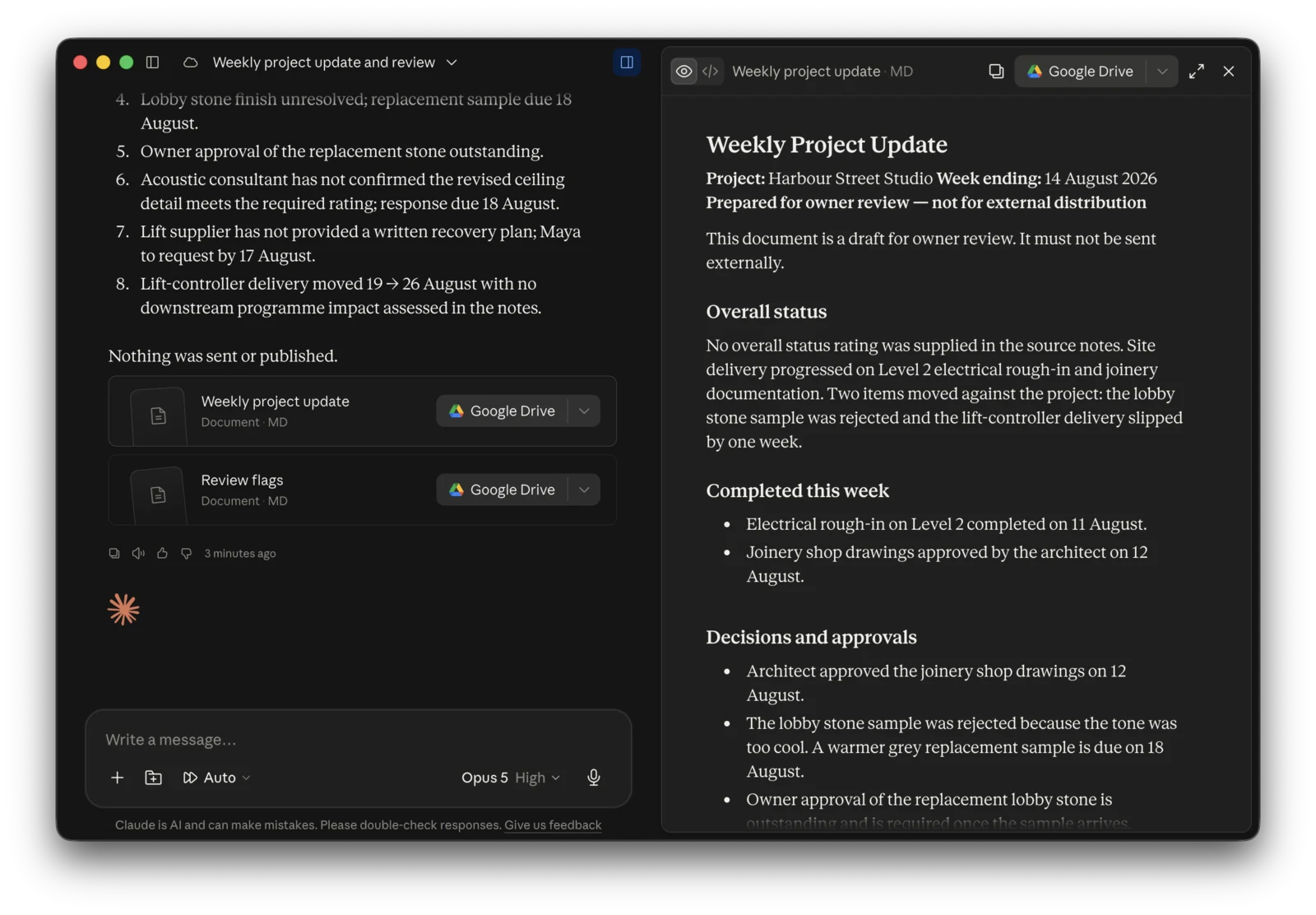
A real Cowork run using fictional source files. It created a weekly project update and a separate review-flags file, kept unresolved items visible, and sent or published nothing.
For this tutorial, the source folder contained an approved template, current-week notes and explicit workflow rules. Cowork produced weekly-project-update.md and review-flags.md; the second file traced missing decisions back to the source notes instead of filling the gaps with guesses.
For a one-off test, attach the known-good example and a small representative input set directly to the session.
For work you expect to repeat, create or choose a project and add the stable reference material: the template, company context, writing rules and definition of done. Keep changing monthly inputs separate from these standing instructions.
Do not add a year of source material yet. One representative run is enough to expose the first mistakes.
Step 5: give Claude an operational brief
Paste a brief with seven parts:
OUTCOME
Draft one monthly project report in our existing Word format.

SOURCES
Use only the files and connected sources supplied for this project.

REFERENCE STANDARD
Follow the headings, order and level of detail in the approved example.

MISSING INFORMATION
Do not invent facts or figures. Mark every unsupported item as NEEDS OWNER INPUT.

ACTION BOUNDARY
Create a draft only. Do not send, publish or update another system.

DEFINITION OF DONE
Complete every supported section, preserve the template and include a review list of gaps.

DELIVERY
Return a Word draft and a short list of items the owner must check.
Replace the example text with your own task. The free Cowork Workflow Builder generates this structure from your answers if you prefer not to start from a blank page.
Step 6: keep consequential actions behind approval
Your first version should stop at a draft.
Do not let a new workflow automatically send a client email, publish content, approve a figure, delete a file or update a production system. Even when the platform asks for permission, you still need a business rule for when the agent should stop.
A good boundary is specific:
Claude may read the selected project sources and create a draft in the output folder. A person reviews every line and performs the external send.
Once a workflow has a reliable test history, you can decide whether any low-risk action should move beyond draft-only. High-consequence decisions should stay with a person.
Step 7: test one historical run
Give Cowork the source material from a period where you already know the correct result. Ask it to perform the task, then compare the output with your approved example.
Review for:
- Missing facts that were present in the sources
- Facts that cannot be traced to a source
- Incorrect figures, names or dates
- Structure and formatting drift
- Unclear escalation when information is missing
- Actions that crossed the stated boundary
Do not quietly fix the output and move on. Every meaningful correction should become a rule.
For example:
Bad correction: change this heading back.
Reusable rule: preserve all template headings exactly, even when a section has no supported update. Mark that section NEEDS OWNER INPUT instead of deleting it.
Our reporting build failed in ordinary ways: a connector disappeared from the menu, a permission required the owner to be present, and one incorrect word in the skill produced a generic draft. The value came from finding those failures before handover. Read the full Cowork build and failure log.
Step 8: turn repeated corrections into standing rules
Run the same test again with your new rules. Then use a second historical period with different inputs and exceptions.
If the instructions are becoming long or the task will be used by other people, organise the process as reusable project instructions or a Cowork skill. Separate:
- Stable business context
- Task-specific procedure
- Output template
- Current-run inputs
- Review and escalation rules
This keeps one change to a company profile or writing voice from being copied into every task prompt.
Step 9: require three acceptable runs
Do not judge a workflow from its best output. Require three representative runs that meet the acceptance checklist.
Use different cases:
- A normal run with complete inputs
- A run with missing or conflicting information
- A run with an unusual exception
Record what was wrong, what rule changed and whether the next run fixed the pattern. If a correction solves one example but damages another, the process is not stable yet.
Our property-report workflow kept owner review even after it produced eight drafts successfully. The task removed document assembly, not responsibility. See the complete monthly investor reports case study.
Step 10: schedule only after the manual version passes
Cowork's current scheduled tasks can use connected tools, skills and plugins, and can run remotely on a chosen cadence. Local folders and local apps have additional constraints, so check Anthropic's current scheduling documentation before relying on an unattended run.
When you schedule the task:
- Reuse the tested instructions rather than rewriting the prompt
- Keep the same source and permission boundary
- Send the output to a review location, not an external recipient
- Check upcoming and past runs
- Define what happens when a source is missing or a connector fails
If the schedule makes the workflow less reviewable, keep the one-click manual run. Recurrence is useful only when failure is visible.
The DIY stopping point
You can reasonably build this yourself when the task reads selected sources, produces a reviewable document and has simple exceptions.
The work becomes an implementation project when you need to organise years of business context, design permissions across several tools, encode a custom skill, transform messy source data, test many exceptions or create a recovery path for actions in another system.
That is also the honest purpose of this tutorial: give you enough to ship a useful first workflow and enough visibility to decide whether finishing it yourself is a good use of your time.
If you want the process installed, tested and handed over, SouthSea Automation builds one recurring workflow at a time. Start with the free Cowork Workflow Builder, then email the resulting brief to Will. SouthSea prices one scoped workflow per report rather than a custom AI assistant build — see priced-per-report vs custom app cost. The same draft-only pattern is how a Melbourne practice gets a Word template filled from photos and notes.
What is Claude Cowork?
Claude Cowork is Anthropic's task-oriented workspace for knowledge work. You give it an outcome, selected files or connected tools, and a definition of done; it carries out multi-step work and returns a deliverable for review. It is better suited to cross-file and cross-tool tasks than a one-off conversational answer.
Can Claude Cowork automate recurring business tasks?
Yes. Cowork can repeat tasks such as reports, briefings and research on a schedule. Start with a manual, draft-only version and test three representative runs before scheduling it. Tasks that depend on local files or local apps may require the desktop app and have different execution constraints.
What is a good first Claude Cowork workflow?
A good first workflow has repeatable inputs, a known output format and a human reviewer. Monthly reports, meeting briefs, draft client updates and recurring slide decks are stronger starting points than automatic sends, financial decisions or broad “run my business” instructions.
Do I need to create a custom Cowork skill?
Not for the first test. Begin with one representative input set, an approved example and an operational brief. Create reusable project instructions or a skill when the process repeats, the rules are becoming long or several people need the same behaviour.
Is this Claude Cowork tutorial a security assessment?
No. It is a practical workflow-design method. Use the smallest possible data scope, follow your organisation's privacy and compliance requirements, and keep sensitive or irreversible actions behind explicit human approval.