How We Used Claude Cowork to Draft 8 Monthly Investor Reports
Claude Cowork can handle a recurring business workflow when the inputs are accessible, the output has a known shape, and a person reviews the result. For one Melbourne property developer, a Cowork reporting skill now turns forwarded project email, Fireflies transcripts and an existing Word template into eight monthly investor-report drafts. The owner still checks every line and sends each report himself.
Published . Updated .
A Melbourne property developer was spending four to five hours on each monthly joint-venture report.
There were eight active projects. That meant 32 to 40 hours every month rebuilding the same Word template from project emails, meeting transcripts and the previous report.
We built one Claude Cowork workspace with a shared company knowledge base and two skills on top. The first skill drafts the investor reports. The second prepares prospect research and marketing drafts.
The interesting part is not that Claude can write. It is the boundary around the work: what the agent can read, what it must never guess, and where the owner takes over.
Not sure whether your task belongs in Cowork? Use the free Claude Cowork Workflow Builder. It turns one recurring task into a task brief, permission plan and review checklist.
If you want to build the first version yourself, follow the step-by-step Claude Cowork recurring workflow tutorial.
The workflow in one minute
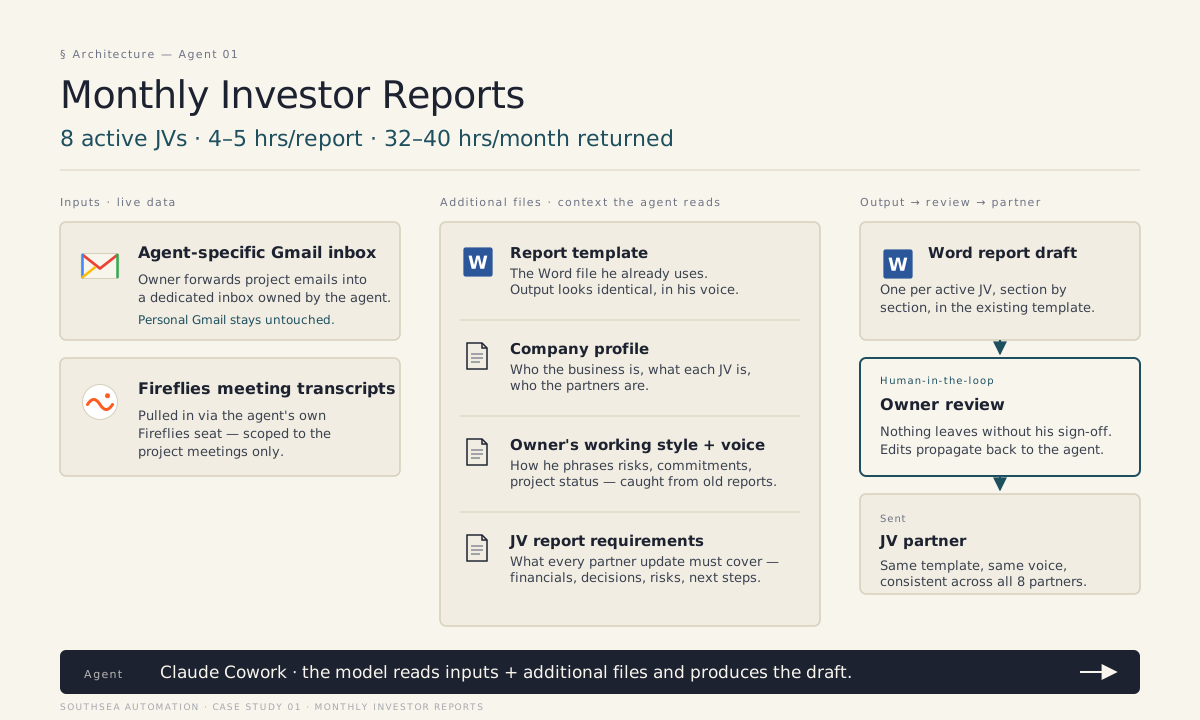
The reporting skill receives:
- Project emails forwarded into a dedicated Gmail inbox
- Fireflies transcripts from project meetings
- The owner's existing Word report template
- A company profile and project context
- Rules for tone, missing information and owner review
It produces:
- One Word draft for each active joint venture
- The same sections and order partners already recognise
- Flags where a fact or figure is missing
- No automatic send
The owner opens each draft, checks every line, makes any final edits and sends it himself.
That is the whole system. No new dashboard. No investor portal. No change to the document partners already know. It is Melbourne AI automation for recurring reports in the form of one Word template, not a new product — cheaper than what custom AI assistants actually cost. The service page is automate monthly investor reports. The same draft-into-existing-template pattern also covers building inspection report automation.
Why a normal Claude chat was not enough
Pasting one meeting transcript into a chat can produce a summary. It does not run a monthly reporting process.
The source material was scattered. The output had a fixed shape. Missing numbers needed to be flagged instead of filled in. The agent needed the owner's working style every month, not just in one conversation.
Cowork was useful because it could hold the project context, work across files and connected tools, and produce finished documents for review. Anthropic now describes Cowork as a workspace for multi-step knowledge work, with projects, skills, connectors and scheduled tasks. Its July 2026 update also added web and mobile access plus background sessions. Read Anthropic's current Cowork guide and web and mobile announcement.
The product capability still did not decide the workflow. Five implementation decisions did.
Decision 1: a forwarding inbox, not the owner's real mailbox
The obvious setup was to connect Cowork to the owner's main inbox.
We did not do that. His mailbox contained years of personal, legal, financial and HR correspondence the reporting workflow did not need.
Instead, he forwards relevant project email into a dedicated Gmail inbox. Anything he does not forward stays outside the workflow. He can stop the data flow by removing a forwarding rule.
That narrower permission boundary also kept the build moving when the Microsoft 365 connector listed by the platform disappeared from the Cowork menu during setup.
Decision 2: a scoped Fireflies seat
The agent did not receive blanket access to the owner's meeting history.
It received its own Fireflies seat and was invited only to the project meetings needed for reporting. That makes the boundary legible: the reporting workflow can read these meetings, not every conversation inside the business.
Decision 3: keep the existing Word template
Partners had been reading the same report format for years. A new dashboard would have created training, adoption and trust problems without removing more work for the owner.
The skill is therefore not asked to “write a good investor report.” It is asked to complete specific sections of an existing template from the current month's source material.
The fixed structure reduces ambiguity. Claude finds the substance; the template supplies the shape.
Decision 4: flag missing information instead of guessing
The skill has an explicit rule: if a figure, decision or status is not supported by the supplied material, mark it for owner input.
An incomplete draft is useful. An invented project update is dangerous.
This rule matters more than another paragraph in the prompt. It defines what happens when the workflow encounters the real world rather than the ideal example.
Decision 5: one workspace, two skills
After the reporting workflow worked, the owner asked whether the same setup could help with prospecting and marketing.
We did not create another isolated agent. We added a marketing skill to the same Cowork workspace. Both skills read the same company profile, working style, project context and writing voice.
The reporting skill adds its own Word template and JV-report rules. The marketing skill adds an Excel CRM, prospect criteria, past social posts and weekly content rules.
The shared knowledge base means a change to the company profile or the owner's voice is made once. The next skill starts with the business context already in place.
What broke during the build
Real automation work includes product friction. This build had plenty:
- The Microsoft 365 connector was listed as supported but missing from the menu. The workflow switched to the dedicated forwarding inbox.
- Cowork workspaces did not appear in the desktop app until developer mode was enabled before installation. A clean reinstall fixed it.
- A Pro-to-Max billing sync gap locked the desktop app for a day. Work continued in the web app.
- The Fireflies permission needed the owner present to grant it. The build paused until he returned.
- At the time of the build, the scheduler did not offer a monthly trigger. The reporting workflow shipped with a one-click manual run at the start of each reporting cycle.
- One incorrect word in the skill file produced a generic first draft. It was caught, fixed and rerun before the owner saw it.
The current Cowork product is different from the version used during the build. Scheduled tasks now run remotely and can repeat on a chosen cadence, while local files and local connectors still have device-specific constraints. Check the current platform notes before copying any architecture.
The result
The first clean run produced eight Word drafts in the time previously needed to write the first report.
The owner still reviews every report and still decides what gets sent. The automation removed assembly work, not responsibility.
The marketing skill went live later on the same workspace. Its first run surfaced 15 prospect targets the owner had not been in front of yet. It now prepares prospect lists, social drafts and Mailchimp drafts for review.
See the complete monthly investor reports case study.
What Claude Cowork can handle by itself
Cowork is a reasonable starting point when:
- The task repeats
- The required inputs live in selected files, folders or supported connectors
- The output is a document, spreadsheet, presentation, research brief or draft
- A stable template or definition of done exists
- A person can review the result before it matters
You may need additional setup when:
- The context must be organised into reusable project knowledge
- A custom skill needs to encode the process
- Permissions must be narrowed across several tools
- Source data must be cleaned or transformed first
- The workflow needs a reliable exception path
A custom workflow layer is usually safer when the task must update production systems, publish externally, make high-stakes numerical decisions, or recover automatically from failures.
Is Claude Cowork safe for business workflows?
It can be used with a controlled scope. Give it only the folders and tools the task needs, keep important sends and changes behind approval, and test against known examples before trusting a recurring run. Anthropic's current documentation also warns that browser and computer use carry additional risk. Review Cowork's current capabilities and safety notes.
Can Claude Cowork run recurring tasks?
Yes. Current Cowork scheduled tasks can run remotely without the computer being awake. A task that depends on local folders, browser access or local connectors may still require the desktop app to remain open. Availability and limits vary by plan and surface.
Does Claude Cowork send reports automatically?
It can take actions when permissions allow, but this implementation does not auto-send investor reports. The owner reviews, edits and sends every document. That boundary protects the partner relationship and catches missing or incorrect information.
Do I need a new dashboard or template?
Usually not. A recurring-document workflow is easier to adopt when it produces the Word, PowerPoint or spreadsheet your team already uses. Change the assembly process before changing the document everyone recognises.
Build your own Cowork workflow brief
The free Claude Cowork Workflow Builder asks about one recurring task, its inputs, output, risk and approval rules. It gives you:
- A Cowork fit assessment
- A ready-to-paste task brief
- A permission boundary
- A human-review checklist
- A three-run acceptance test
Nothing is uploaded or stored.
If the resulting brief shows that Cowork alone is enough, use it. If the task needs a custom skill, connector or workflow layer, email the brief to Will and he will tell you what the missing setup involves.